Sembix Strata™ · Launch
Autopilot gets more of your backlog built, and a person still merges every change

Jack Histon, Co-Founder & CTO
Your backlog holds work that is clear enough for an agent to build, but each piece still waits for someone to start it, answer its questions and then chase the result. Autopilot, now in Strata, starts that work on rules your admins write and carries it to a pull request for a person to review.
Your team clears more of its backlog without anyone having to start each piece of work
Autopilot picks up the work your rules allow and sets Strata's AI agents building it, so nobody has to start each piece and the backlog keeps moving while your team is busy elsewhere. Each piece of work becomes a Seismic run: Strata's agents building a change and checking it against what was asked for until it is ready for review. An organisation or project admin writes the rules, and they can cover three kinds of work. The first is backlog issues. The second is feedback from stakeholder reviews that a project manager has approved, which now arrives as backlog issues so the same rule picks it up. The third is fixes where your code breaks the standards your organisation has adopted, and each of those fixes appears as its own task on the team's planning board, alongside the rest of the work.
Some issues belong to the same piece of work, which Strata calls a journey. A rule can start those issues together. They are built in one run and come back as one pull request per codebase, so related changes share context and reviewers see them side by side. Rules you already have keep working one issue at a time until an admin turns grouping on.
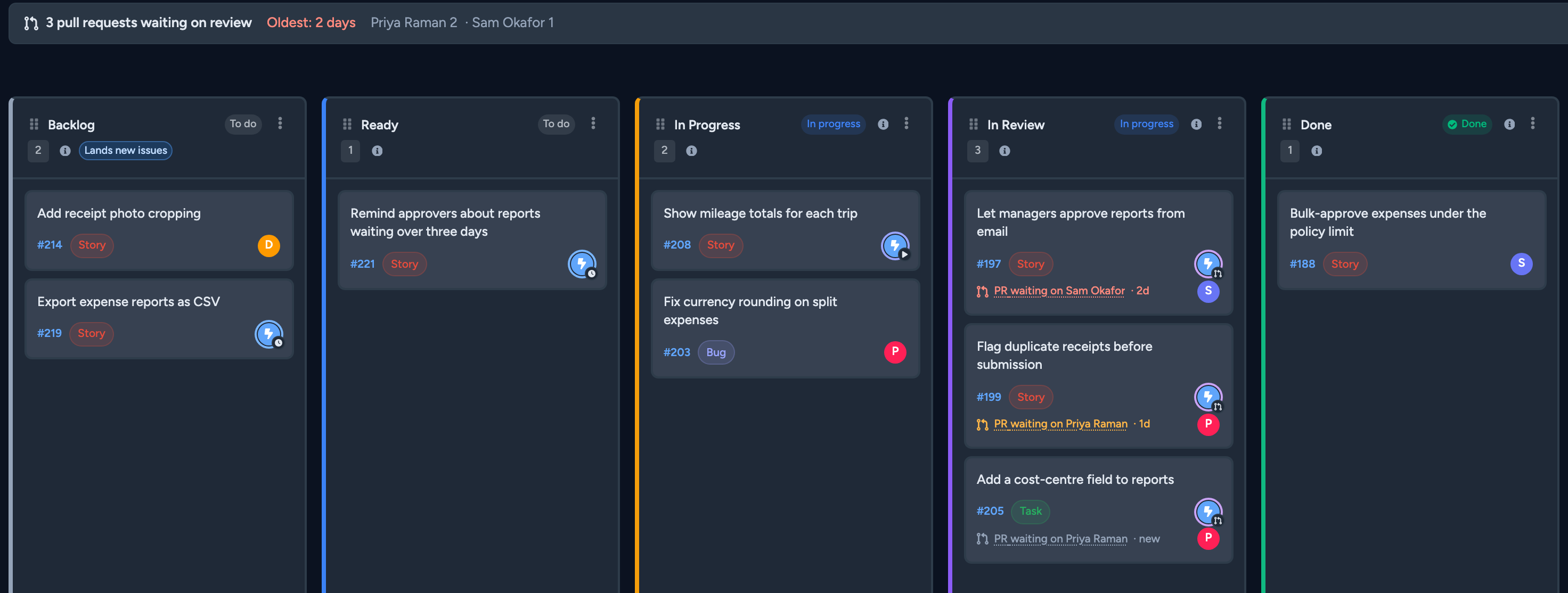
Agent work used to look unassigned on the board, so a person could pick up a task an agent was already halfway through. Autopilot now appears as its own assignee, marked with the state of its work, and anyone can filter the board to show only what the agents are working on. Your team can see at a glance which work the agents already have in hand, so they spend their time on the rest.
Reviewers know what each change assumed and what still needs a person before it ships
A run no longer stops to ask questions: it takes the answer it recommends, lists that assumption in the pull request and carries on, so reviewers judge finished work instead of chasing a stalled run. Runs used to stop whenever they hit a question and wait until someone came back to unblock them. The pull request now lists three things: each assumption the run made, each check only a person can confirm, and any change it suggests to the issue's acceptance criteria. Once the work is built, the run opens the pull request, waits for your automated tests and pushes fixes for any failures before it finishes. You can follow each step in Strata as it happens. The reviewer no longer inherits a failing build along with the review.
A run still pauses in a few cases. It stops when it reaches its spending limit, and it waits for a person's approval at certain security steps, such as before it changes your cloud setup. A run that Autopilot started also waits before it changes the settings for previews, the temporary copies of your software where people try out a change. Autopilot never merges, which means it never accepts a change into your code itself. A person reads the pull request and decides what ships.
Every change Autopilot builds has a named person to merge it, so finished work stops waiting
Every Autopilot rule now names a merge owner, the person responsible for reviewing and accepting its changes, so each finished pull request reaches someone who will act on it instead of sitting unmerged. An admin names a reviewer as merge owner when setting up a rule, and every rule must have one. When a pull request opens, the owner gets a notification and then a reminder after 24 hours, even if they haven't subscribed to Autopilot updates. The board shows whose change is waiting and for how long, turning amber after a day and red after two, and counts how many each reviewer has outstanding. Each reviewer can filter the board to the changes waiting on them.
The old routine of asking around for who is meant to look at an agent's pull request is gone. The merge owner still decides whether each change ships, because Autopilot never merges.
Spend and workload stay inside the limits you set
Autopilot can be set to take on new work only as fast as your team reviews what it has already built, and each run's budget is set from what this project's past work cost, so neither the review queue nor the spend runs ahead of you. Autopilot works on a limited number of pieces at once. Under the Steady pace, a finished piece keeps its place until a person marks it done, so new work starts only as fast as your team clears what is waiting. Under Eager, a place frees up the moment a run ends. That was how Autopilot always behaved, and a rule matching many issues could pile up pull requests faster than anyone could review them.
You also choose what happens when someone stops a run: either the work stays on hold until a person releases it, or Autopilot may pick it up again later like any other work its rules match. Before, stopping a run had no effect on whether the work was held. Both settings are made for the organisation, and each project can override them.
Each run's spend limit is now estimated from the project's own record: it is set high enough to cover nine in ten of the project's last 50 completed pieces of work. It replaces a fixed $15 starting figure that had nothing to do with what runs actually cost, which is why most runs used to pause for someone to extend them. Each project works within its own budget, and the spend shown on the board updates every 15 seconds while a run works.
Getting started
This arrives with your next Strata upgrade. If you're not sure which version you're on, your Strata administrator can tell you.
Autopilot ships switched off for your organisation and for every project. An organisation admin turns it on for the organisation and sets the default pace and stop behaviour. A project admin then switches it on for a project and writes its rules. Before you start, decide which work agents may pick up, what each project may spend, who merges each rule's pull requests, and whether your team reviews fast enough for Eager or should choose Steady.