Sembix Strata™ · Launch · Run
The environments your software already runs in join Strata without calling in a specialist

Jack Histon, Co-Founder & CTO
Your software already runs in environments, the named places where a version of it can be reached at an address, but connecting one to Strata meant knowing which form to open and copying access details, settings and values across by hand. Filling it with test data meant building that data by hand, one table at a time.
One admin brings in the environments you already run, and nobody else stops to help
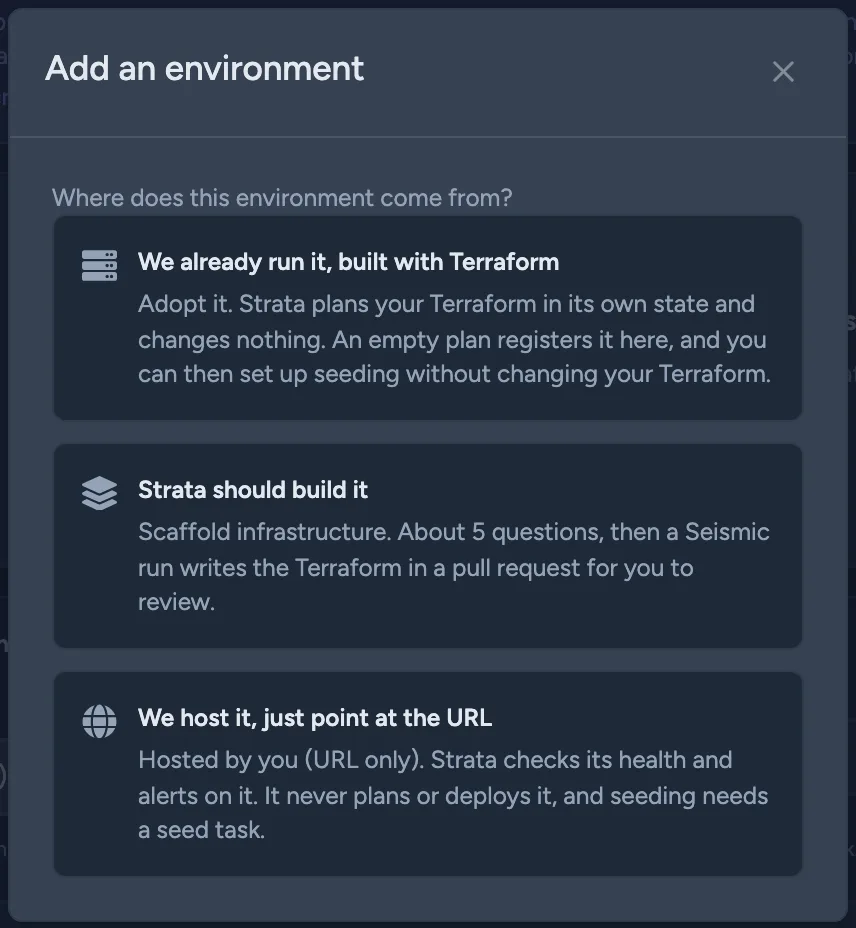
When an admin adds an environment, Strata now asks where it comes from and picks up its settings itself, so one admin can bring an existing environment in without help. Picture an admin connecting an environment the team already runs. Strata first asks which kind it is: one your engineers already define in code, a new one to set up from scratch, or one that is already running and just needs registering. Each answer opens the right form directly, so nobody has to know in advance which one applies.
From there Strata reads the environment's settings and values from the files your engineers already keep. The admin used to copy them across by hand, a chore best done with two windows and a steady nerve. Strata also lists every problem in one go, before it touches anything, so the admin isn't fixing one problem only to meet the next. Once it has confirmed it can reach the environment, it fills in the access details itself, so nobody copies them across.
Because the admin can do this alone, engineers aren't pulled away from their own work to sit alongside them. It brings an environment into Strata; deciding which ones belong there, and fixing what it flags, is still a person's job.
Reviewers see a change working on data made for the journey it serves
Strata can now build an environment's demo and test data from your user journeys, the step-by-step paths people take through your app, so reviewers see a change working on data shaped like real use. Picture a reviewer about to walk through a new journey in an environment that has no data to fit it. Before, someone on the team built that data by hand, one table at a time, patient work that never makes it onto a roadmap. Now the team picks the journeys the data should support and answers a few questions, such as what a finished journey should leave behind and which things it involves, say a booking service's customers and appointments. Strata works out what data to create from there.
Nothing is saved until a person has looked. The team previews the rows Strata will create, and when they look right, one action creates the starter data, which Strata calls a seed pack. The reviewer then walks the journey on data made for it.
Making seed packs from journeys stays off until an organisation admin turns it on. It draws only on journeys your team has already mapped in Strata, so a journey that isn't there yet won't shape the data.
Getting started
Available from Strata 3.215.1. If you're not sure which version you're on, your Strata administrator can tell you.
An organisation admin first turns on environments, and Strata taking over infrastructure your team already built, in the organisation settings. After that, an organisation admin connects them from the application's Environments page. If those settings aren't there, ask Sembix to turn on environments for your Strata account. Before you start, sort your environments into three kinds: ones your engineers already define in code, which you adopt; ones that are already running, which you register; and ones you set up new. Seed packs built from journeys have a switch of their own in the same settings, which works once seeding is on.