Sembix Strata™ · Launch · Build
My work: every question an agent is waiting on, in one place

Jack Histon, Co-Founder & CTO
A developer working across several Strata projects had to open each one in turn to find out whether one of the AI agents building the software was waiting on them. A question asked in a project nobody opened that morning held the work up until somebody did, and the agent sat idle for every minute of it.
No agent sits waiting on a question nobody has seen
My work, a new page in Strata, gathers everything waiting on a developer across every project they can see, so agents get their answers sooner.
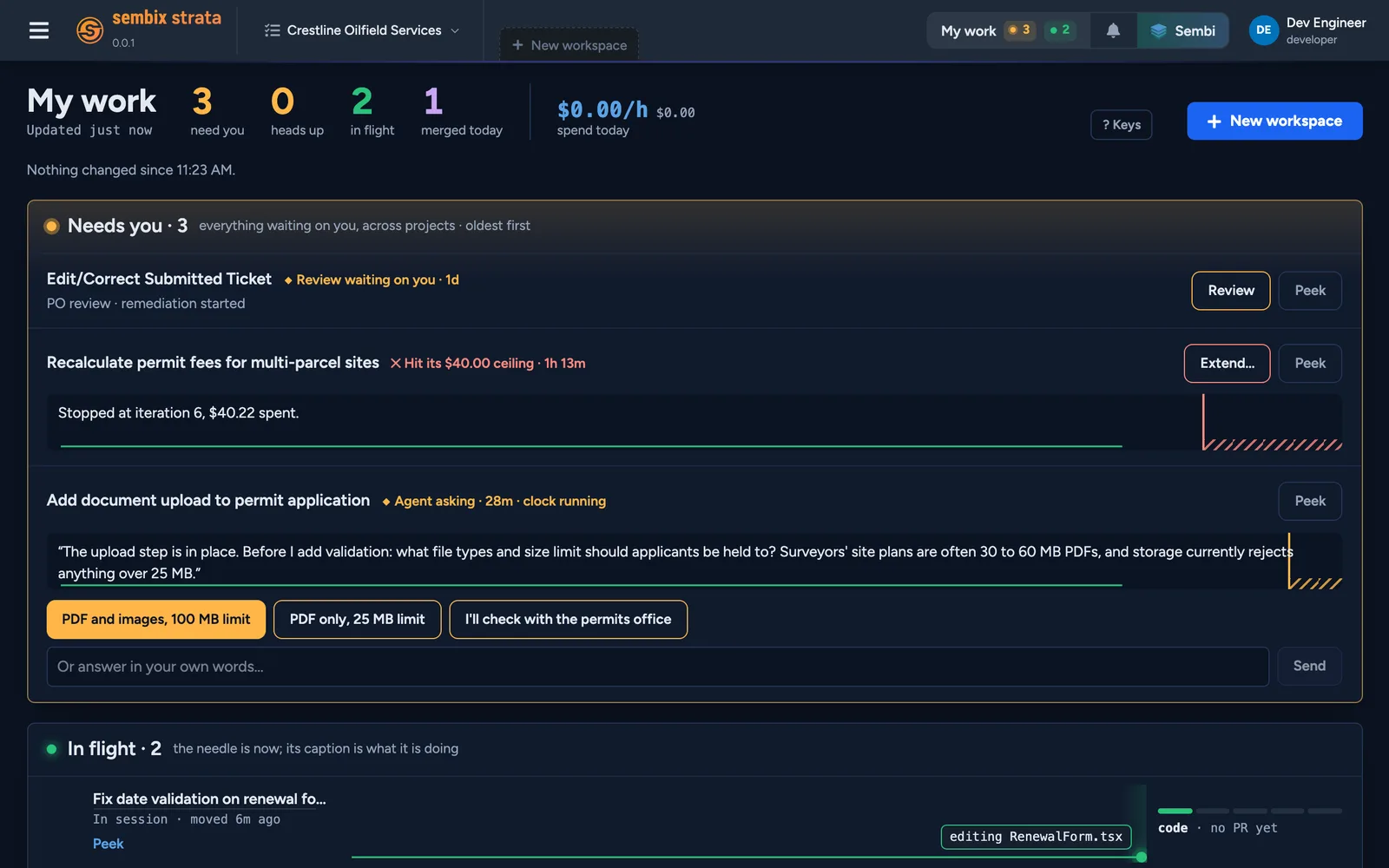
Picture a developer starting the day with work running in three projects. Before, they would open each project, then each workspace, looking for a question or a stalled run, and hope they hadn't missed one. Now they open My work and see it all in one list: three items need them, two are moving, and one pull request has merged today. A count in the header says something is waiting even while they are elsewhere in Strata, so a question asked mid-afternoon doesn't wait until tomorrow morning to be seen.
The page says what it couldn't read, too. If one project fails to load, My work names it and shows the rest, so a gap is never mistaken for a quiet day.
Answers take moments, not a detour into the project
Developers answer an agent's question right where it appears on My work, so a decision no longer means finding the right project, then the right workspace, before typing a word.
In the example above, an agent building document upload for a permit application has asked what file types and size limit applicants should be held to. The question is on the card, with the replies the agent suggests underneath. The developer picks one, or types their own answer, and the agent carries on. On the card above it, a Seismic run (Strata's mode in which the agent works through a job on its own, within a budget) has reached its $40 limit. The developer can give it more budget from the same page and let it finish.
My work decides nothing itself. Every answer and every extension is still a person's choice, and the agent waits until they make it. What changes is how quickly the right person sees the question.
The day's progress, without asking anyone for it
The rest of the page shows what is moving and what has merged today, so a developer knows where their work stands without opening each workspace or asking the team.
Each item that is moving shows what the agent is doing right now, such as running the tests or editing a file. Work that merged today is listed with its pull request. My work shows each developer only what they could already open in the project, so it adds no new view of anyone else's work.
Getting started
This arrives with your next Strata upgrade, and there is nothing to turn on. Anyone who can see workspaces in a project has My work in the header. Once you have started a workspace of your own, Strata opens on My work. Extending a Seismic run from it needs the same permission as running one. The project spending chart now sits on each project's Usage page.