Sembix Strata™ · Launch · Build
Autopilot Goals: finish a milestone by a date, within a budget you set

Jack Histon, Co-Founder & CTO
Autopilot starts backlog work by standing rules your team sets, but it can't be told to finish one milestone by a date for a set amount. So someone still has to pick what it starts next; Autopilot Goals take over that choice, while a named owner still answers for when the milestone lands.
Your team finishes a whole milestone without anyone stopping to choose what starts next
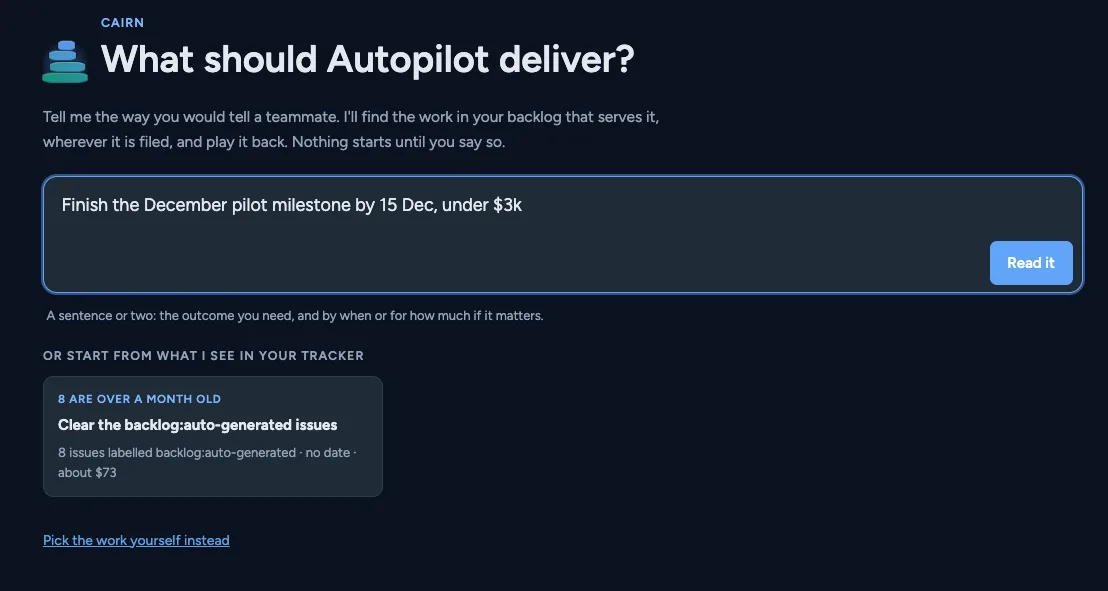
Project administrators can now hand Autopilot a set of issues to finish by a deadline, within a budget and under a named owner, so nobody on the team has to keep deciding what it starts next. That set is called a goal, and setting one up is a lot like briefing a team. The administrator describes the work in a sentence, and Strata's planning assistant, Cairn, finds the matching issues, the tracked tasks that make up the backlog. The goal records which issues to finish, by when, for how much, and who owns it. Autopilot then picks the batches of issues that deliver it, puts them in order and runs them without asking again. The standing job of deciding what Autopilot should take on next goes away quietly.
Goals run alongside Autopilot's usual rules, and a project can run several at once, so the rest of the backlog keeps moving while a milestone is under way. A goal decides what Autopilot starts and in what order. It doesn't choose the milestone for you, and it needs a named owner who answers for it.
Each milestone spends only its own budget, a monthly share at a time
Every goal has one budget for its whole life, and Strata spends no more than a monthly share of it, so a milestone can't quietly use up the money meant for the rest of the project. Before an administrator saves a new goal, Strata shows how it fits into the project's monthly spending limit alongside the goals already running.
Autopilot does not ask before each batch: once a goal is set, it runs within the limits it was given. The administrator can still skip any batch it has lined up, pause the goal or end it. Nobody has to approve each batch, which is the point, and also the reason to get the brief right. That makes setting up the goal the moment to be careful: the budget, the deadline and the list of issues are the decisions that matter.
Sponsors see whether a milestone will land on time without calling a meeting
Cairn estimates each goal's finish date from how long your team's issues have actually taken and tracks spend and progress to the deadline, so a sponsor can see whether a milestone will land without asking for a meeting. Strata already records how long each of your team's issues takes from start to finish, and the estimate is built from that record. That gives a sponsor a date based on the team's own pace, not on the optimism of a planning meeting. As each batch runs, Cairn tracks spending against the goal's budget and progress against its deadline. If a goal is spending faster than it finishes issues, or finishing too slowly to make the deadline, the owner sees it while they can still decide what to drop or move. It is still only an estimate: if the team's history says a deadline is tight, it stays tight.
Getting started
This arrives with your next Strata upgrade. If you're not sure which version you're on, your Strata administrator can tell you.
Project administrators, who manage a project's settings in Strata, can create a goal from the Autopilot page by describing the work in a sentence. Agree four things first: which issues count, the deadline if there is one, the total budget and the owner. Also decide whether Autopilot's usual rules should keep a set amount of each month's spending limit; leave it empty and they get whatever the goals don't take. If your project has little history of finished issues yet, treat the first estimate as a starting point, not a commitment.